
LLM-as-a-judge inside ClickHouse with Jev


ClickHouse Cloud can run a Python UDF, and that UDF can call an API. Point it at Jev — TypeSafe's structured-decision model, which returns a typed choice rather than prose and so can't invent a label outside your taxonomy — and you get classification and scoring entirely inside the warehouse. Four SQL statements and one uploaded zip.
Input runs $0.042 per million tokens and output is free. A few thousand rows costs well under a dollar.
One thing you don't have to verify first: the Cloud Python UDF sandbox does allow outbound HTTPS. That isn't documented anywhere, so assume it works — we confirmed it in September 2026 on a standard Cloud service.
The example schema
Every query below runs against one deliberately boring table. Substitute your own — only four columns are load-bearing.
CREATE TABLE documents
(
    id         UUID,
    body       String,      -- the text sent to the model
    created_at DateTime,    -- used to bucket the weekly charts
    updated_at DateTime     -- used for the quiet period in step 3
)
ENGINE = MergeTree
ORDER BY id;
body is whatever you want judged or classified: a support ticket, a product description, a chat transcript assembled from its messages. If yours is a conversation spread over rows, join and concatenate it in the candidates view in step 3 — the UDF only ever sees one string per row.
Step 1: write the UDF
One file. It reads one JSON object per line from stdin and must write exactly one JSON object per line back, in the same order. Mismatched counts fail the query.
import json, os, sys
import requests

DECISIONS_URL = 'https://openrouter.ai/api/alpha/decisions'
MODEL = 'typesafe/jev-1.13'

QUESTIONS = {
    'pet': {
        'type': 'choice',
        'instructions': 'Which pet is this text mainly about?',
        'criteria': {
            'cat':     'Mainly about a cat, kitten, or cats in general.',
            'dog':     'Mainly about a dog, puppy, or dogs in general.',
            'neither': 'About some other animal, or not about pets at all.'
        }
    }
}

def api_key():
    here = os.path.dirname(os.path.abspath(__file__))
    with open(os.path.join(here, 'config.json')) as fh:
        return json.load(fh)['openrouter_api_key']

def classify(text, key):
    r = requests.post(
        DECISIONS_URL,
        headers={'Authorization': f'Bearer {key}', 'Content-Type': 'application/json'},
        json={'model': MODEL, 'state': {'text': text}, 'questions': QUESTIONS},
        timeout=9
    )
    r.raise_for_status()
    a = r.json()['answers']['pet']
    return {'label': a['choice'], 'confidence': float(a.get('confidence', 0))}

def main():
    key = api_key()
    for line in sys.stdin:
        if not line.strip():
            continue
        try:
            verdict = classify(json.loads(line)['text'], key)
        except Exception as exc:
            verdict = {'label': '', 'error': f'{type(exc).__name__}: {exc}'}
        print(json.dumps({'result': json.dumps(verdict)}))
        sys.stdout.flush()

if __name__ == '__main__':
    main()
The criteria map is the whole configuration surface. Its keys are the label set, and Jev cannot return anything outside them — swap in your own categories and descriptions and the rest of this page is unchanged.
A failed row emits a blank label instead of raising. That matters in step 3 — blank labels retry themselves.
Note the Decisions API sits at /api/alpha/decisions, outside the /api/v1 path the chat client uses. With the OpenRouter SDK you need a separate client with serverURL set, or it 404s.
Zip main.py, a requirements.txt containing requests, and a config.json holding your key. Flat, no symlinks:
zip -j classify.zip main.py requirements.txt config.jsonStep 2: upload it
UDFs live under your organization, not your service — bottom-left menu, then User-defined functions.
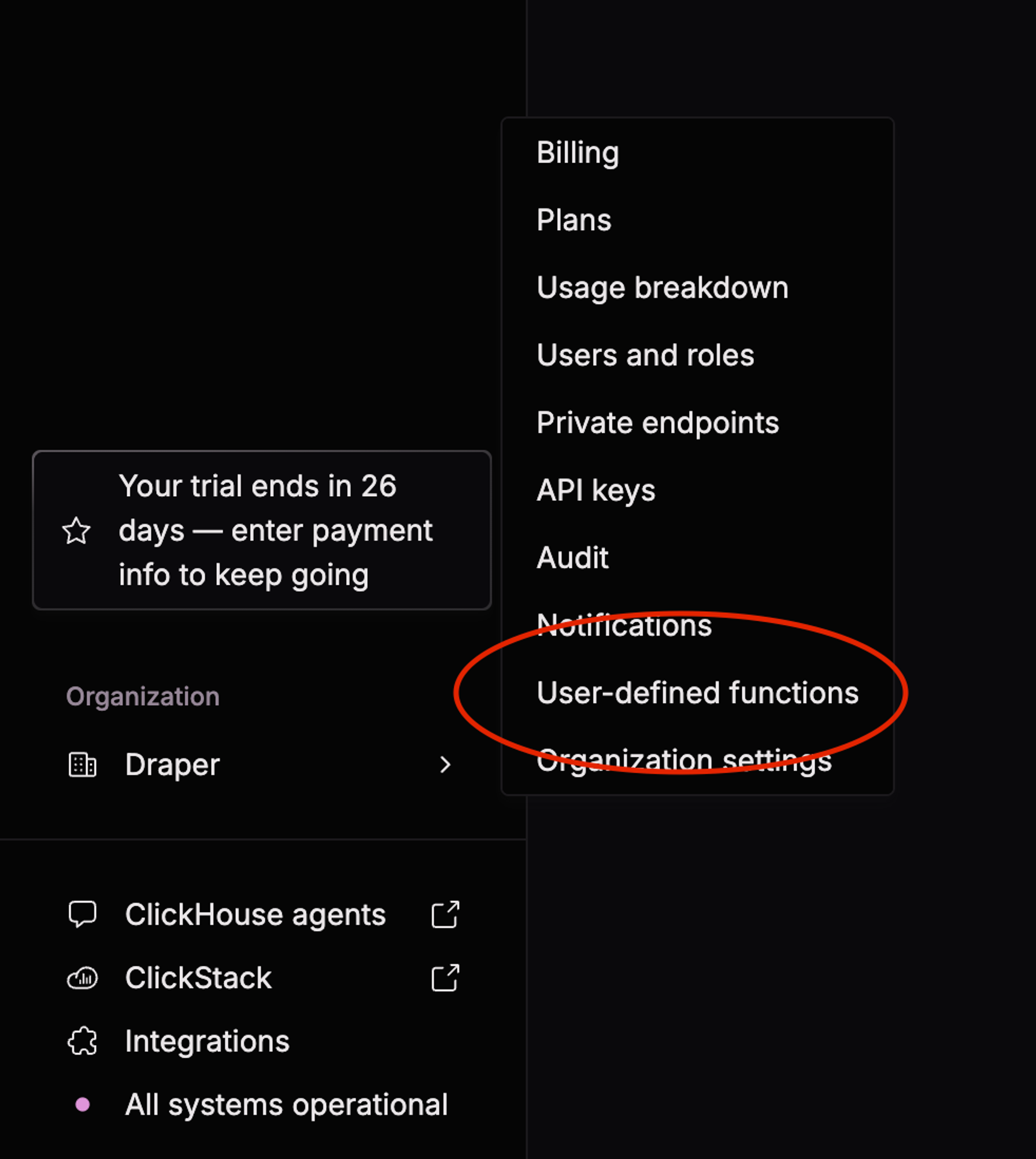
Click your organization name at the bottom-left, then User-defined functions — then Set up a UDF.
Create the function with one String argument named text, a String return type, and format JSONEachRow. The default TabSeparated breaks the moment your text contains a tab.
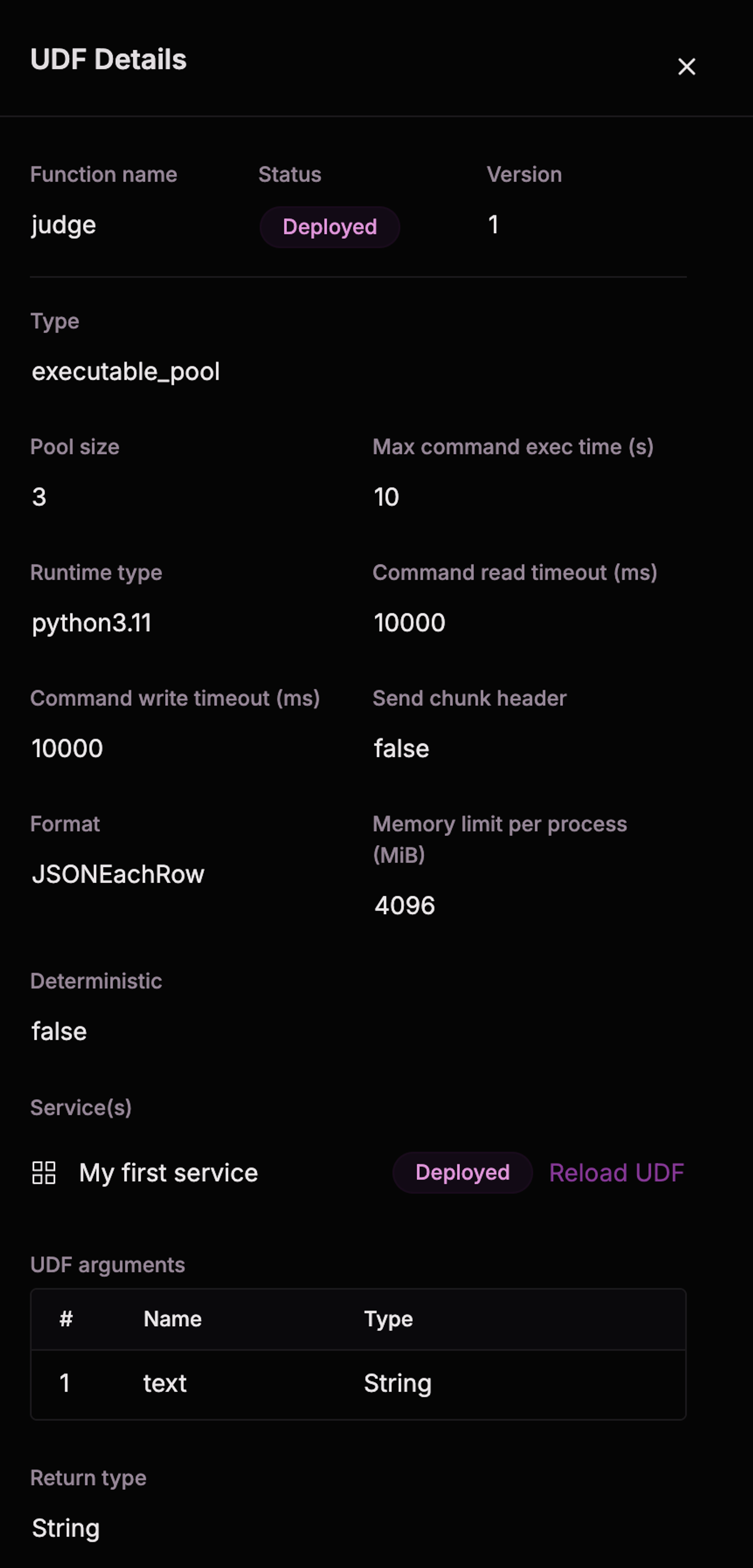
The settings that matter, once deployed: runtime, format, the argument name and type, and the timeouts. Status moves through building → provisioning → deployed*; if it stalls, wake the service.*
If you pick executable_pool, check Max command exec time. Ours is 10 seconds, so the HTTP timeout in the Python must sit under it — otherwise ClickHouse kills the process mid-call and you get a confusing pipeline error rather than a clean timeout.
Smoke-test before wiring anything up:
SELECT classify('We adopted a rescue greyhound last month and she sleeps all day.');Step 3: the pipeline
Results go in their own table. Scheduled ALTER TABLE ... UPDATE mutations rewrite whole data parts and get expensive fast.
CREATE TABLE doc_labels
(
    doc_id      UUID,
    label       LowCardinality(String),
    confidence  Float32,
    labelled_at DateTime DEFAULT now()
)
ENGINE = ReplacingMergeTree(labelled_at)
ORDER BY doc_id;
ReplacingMergeTree keeps the newest row per id, so a double run is harmless.
CREATE OR REPLACE VIEW docs_awaiting_label AS
SELECT
    d.id                        AS doc_id,
    substring(d.body, 1, 60000) AS text
FROM documents AS d
WHERE d.id NOT IN (SELECT doc_id FROM doc_labels)
  AND d.updated_at < now() - INTERVAL 30 MINUTE;
Leave this view un-windowed so the scheduled job and a one-off backfill share one definition of "a candidate".
CREATE MATERIALIZED VIEW doc_label_job
REFRESH EVERY 10 MINUTE APPEND
TO doc_labels
AS
WITH classified AS (
    SELECT doc_id, classify(text) AS verdict
    FROM docs_awaiting_label
    LIMIT 100
)
SELECT
    doc_id                                  AS doc_id,
    JSONExtractString(verdict, 'label')     AS label,
    JSONExtractFloat(verdict, 'confidence') AS confidence,
    now()                                   AS labelled_at
FROM classified
WHERE label != '';
Three things are doing work here:
- NOT IN in the view means a rerun never re-pays for a row already done.
- LIMIT 100 caps spend per run, so a backlog drains over several runs rather than one query that times out.
- WHERE label != '' drops rows the UDF couldn't classify, so they stay candidates and retry on the next refresh. Errors retry themselves.
APPEND is required. Without it each refresh replaces the whole table with that run's results.
To backfill, run the same SELECT as an INSERT with a bigger LIMIT, repeatedly, until SELECT count() FROM docs_awaiting_label reads zero.
Step 4: swap classification for judging
Same machinery, different question type. A noul question is yes/no and returns a calibrated probability rather than a label:
QUESTIONS = {
    'satisfied': {
        'type': 'noul',
        'instructions': 'By the end of the conversation the user had got what they came for, '
                        'and did not express frustration, repeat themselves, or give up'
    }
}
Read it as answers['satisfied']['noul'] and store it as Float32:
return {'satisfied': float(r.json()['answers']['satisfied']['noul'])}Keep the probability rather than thresholding in Python. The cutoff then lives in SQL and moves without a redeploy.
You can send several noul questions in one request — Jev answers them in parallel, so five cost roughly what one costs. Resist the urge to add many: overlapping questions all fire on the same underlying failure, which inflates every number and tells you nothing you didn't already know from one of them.
Step 5: chart it
Composition over time, for the classifier. One row per week per label, rendered as a stacked bar:
SELECT
    toStartOfWeek(d.created_at) AS week,
    l.label                     AS label,
    count()                     AS docs
FROM doc_labels AS l FINAL
INNER JOIN documents AS d ON d.id = l.doc_id
GROUP BY week, label
ORDER BY week, label;
For the judge, chart the share of rows above your threshold, not the average probability. avg(satisfied) is a mean confidence and can sit a long way from the share of rows that actually clear the bar — it reads like a rate and isn't one:
SELECT
    toStartOfWeek(d.created_at)                           AS week,
    count()                                               AS judged,
    round(countIf(l.satisfied >= 0.7) / count(), 3)       AS satisfied_rate
FROM doc_labels AS l FINAL
INNER JOIN documents AS d ON d.id = l.doc_id
GROUP BY week
HAVING judged >= 5
ORDER BY week;
HAVING judged >= 5 suppresses weeks too thin to read as a rate at all.
Plot satisfied_rate as a line and judged as a separate bar chart. The temptation is one chart with the rate on a left axis and the count on a right, but a second y-axis can be scaled to show any relationship you like — it's the easiest way to mislead yourself. Two charts side by side answer the same question honestly, and the volume one is what tells you whether a dip in the rate is a real regression or just a quiet week.
Gotchas
Averaging probabilities is not a rate. See step 5 — chart countIf(satisfied >= 0.7) / count(), never avg(satisfied).
Truncate from the right end. The context window is 32k, so long text gets cut. Classifying by topic? Keep the head — the subject is usually established early. Judging satisfaction? Keep the tail, with right(body, 60000) — frustration and abandonment happen at the end.
Wait for rows to settle. The anti-join means each row is processed exactly once, so a row still being written gets scored on a fragment and never revisited. A quiet period in the WHERE fixes it.
Match key types. ClickPipes maps Postgres uuid to ClickHouse UUID. Declare your results table String and every join fails with "no supertype for types String, UUID".