
The Ultimate Claude Code Parallelisation Guide (2026)

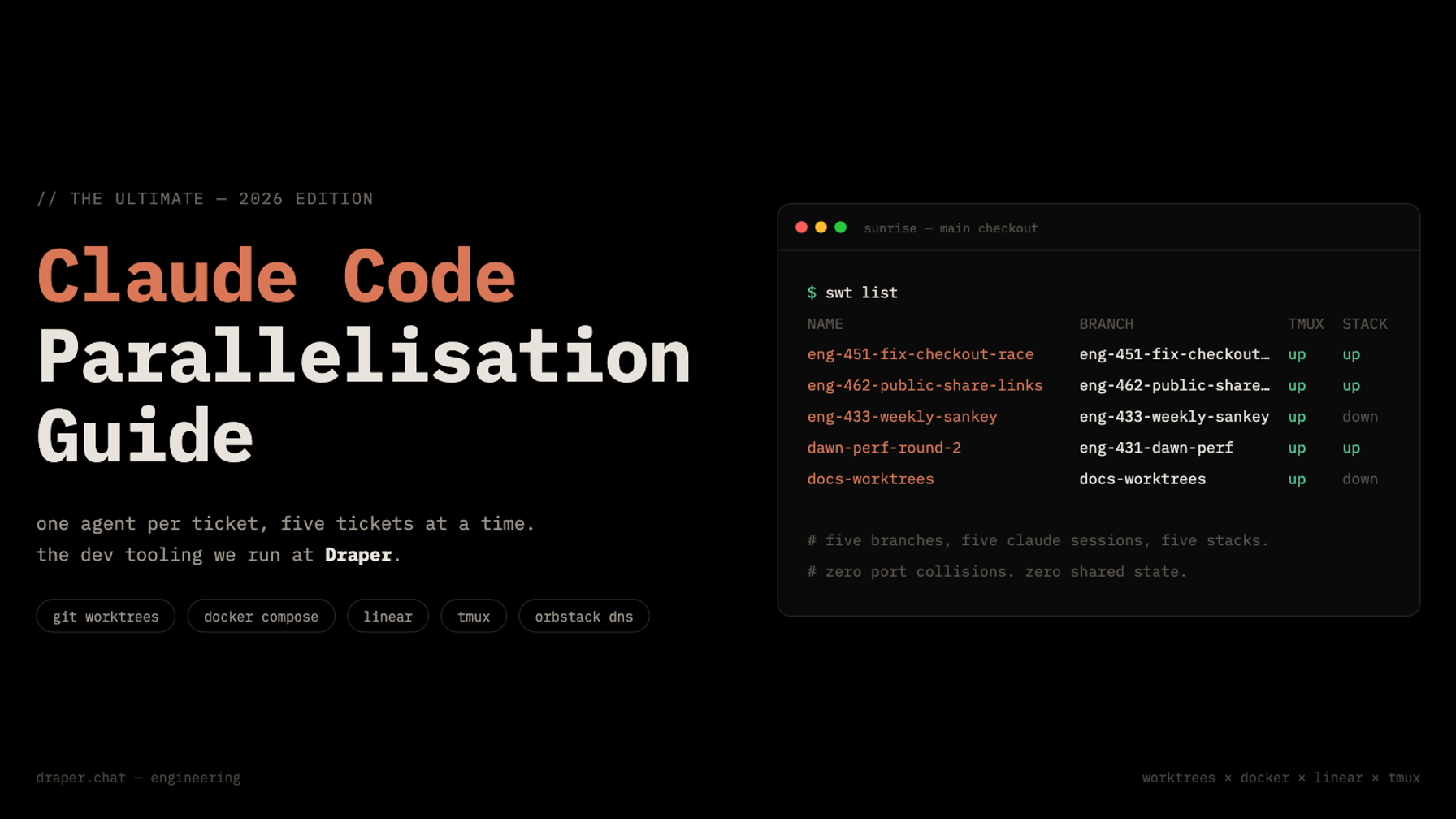
How we run five Claude Code sessions at once at Draper: git worktrees, Docker, Linear, tmux, and a small CLI we call swt.
One Claude Code session is a great engineer. Five Claude Code sessions in the same checkout are five great engineers fighting over one desk, one database, and one set of ports.
This post is the full recipe we use at Draper to run many agents in parallel without them ever touching each other: how tickets flow from Slack through Linear, how Docker plus git worktrees gives each agent a private universe, and how one command (swt new eng-451) turns a ticket into a running, isolated, agent-ready workspace with a draft PR already open.
Two notes before we start:
- This article covers our development tooling only, not how the deploy works. The deploy side (per-PR preview environments, the release pipeline itself) is its own story, and we're happy to write it up if people want it. Let us know.
- Everything in this post was built by asking an agent to build it. At every step I've included the prompt you can paste into your own agent to get the equivalent for your repo. You don't need to write any of this by hand.
1. The motivation: Claude sessions aren't isolated by default
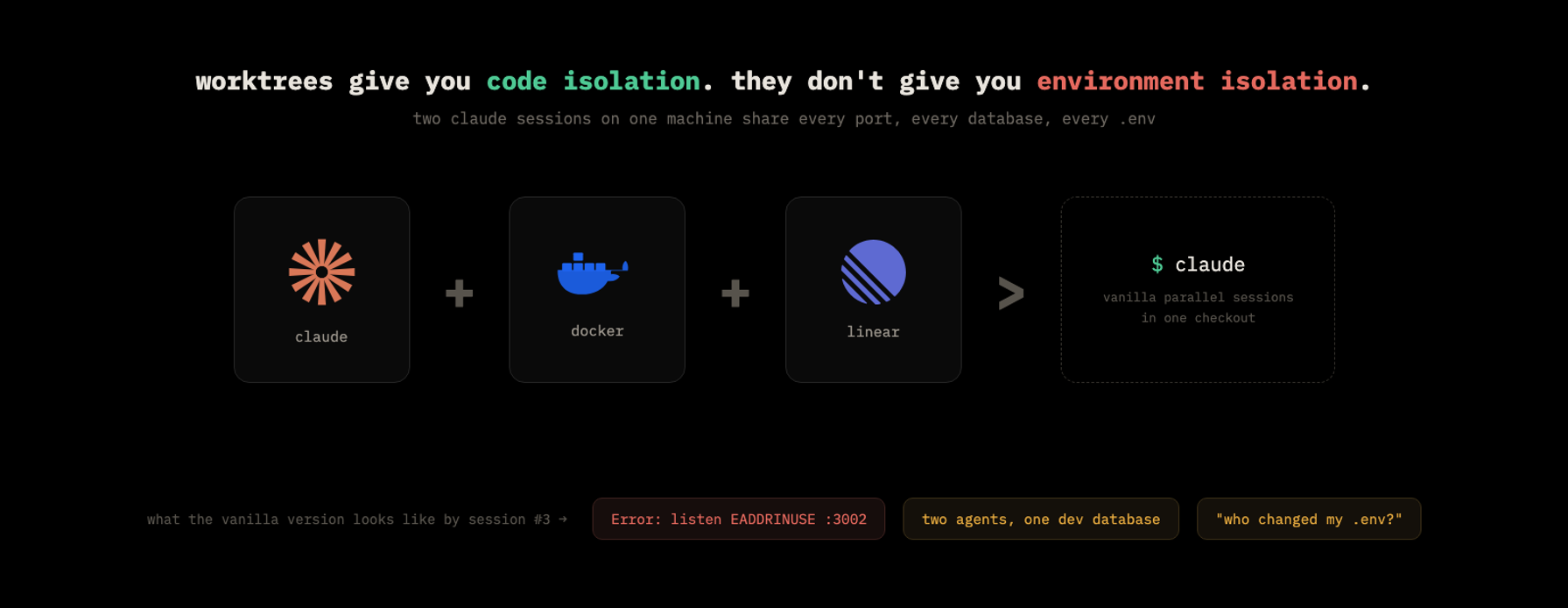
Git worktrees solve half the problem, and it's the half everyone talks about. Each worktree is a separate checkout on its own branch, so two agents never edit the same file. Code isolation: done.
Then session two starts its dev server.
Our monorepo runs a Nuxt chat app on 3002, a Fastify API on 3000, a node-graph editor on 3003, a Prefect server on 4200, a CMS dev server on 4001 and an OTLP collector on 4318. Claude Code sessions are port-hungry: every parallel session wants its own copy of all of that. The second session either dies with EADDRINUSE, or, much worse, it silently connects to the first session's server and cheerfully "verifies" its change against code it never wrote. That second failure mode is the expensive one. The agent isn't wrong, its world is.
And ports are only the visible symptom. Vanilla parallel sessions also share:
- One database. Agent A runs a half-finished migration while agent B is mid-task. Agent B's world just changed shape underneath it.
- One .env. An agent tweaks a variable to test something, and every other session inherits it.
- One set of background state: queues, caches, uploaded files, seeded users.
So the actual requirement is stronger than "separate branches." Every session needs its own environment: own services, own database, own hostnames, own blast radius. That's the recipe in one line:
Claude Code + Docker + Linear > Claude Code.
Docker gives each session its environment. Linear gives each session its purpose. The rest of this post wires those together.
2. The Linear ticket lifecycle
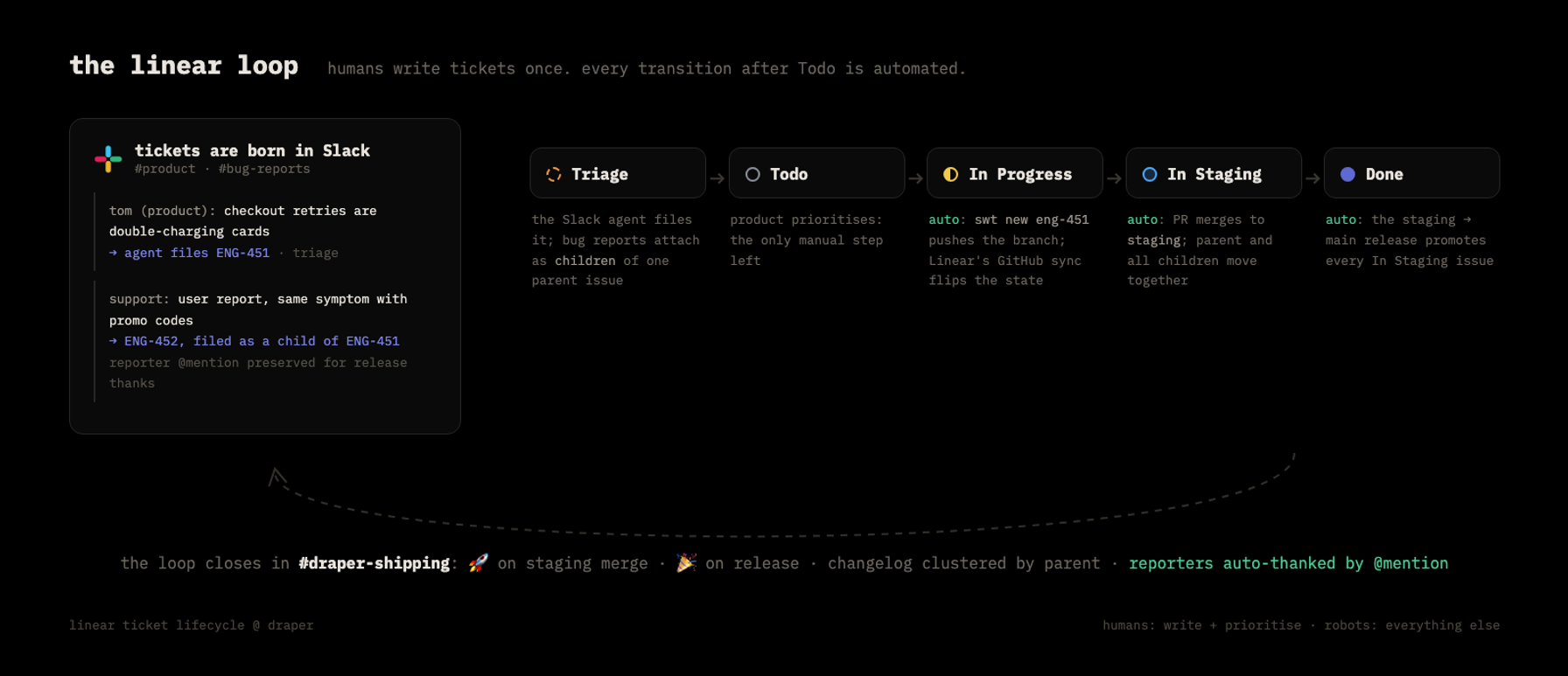
Work enters our system in exactly one place: Slack. The product team writes tickets in plain English in a product channel, and bug reports land in a reports channel; an agent files both into Linear as Triage issues. Nobody opens Linear to create a ticket.
Two details of how those tickets are filed do a lot of quiet work later:
- Bug reports become children. A Linear parent issue represents one feature or fix that ships as one PR. User-reported symptoms of it get filed as sub-issues of that parent. When the PR eventually merges with a Fixes ENG-451, ENG-452, ENG-453 line, the whole family closes together.
- The reporter's @mention is preserved. The Slack agent stores the reporting user's Slack mention on the Linear issue when it files it. Months of goodwill come from this one field, as you'll see in section 5.
From there the lifecycle is: Triage → Todo → In Progress → In Staging → Done.
Here's the important part: humans only touch the first two states. Product triages and prioritises into Todo. After that:
- In Progress happens automatically the moment an engineer (or their agent) starts the work, because starting the work pushes a branch named after the ticket, and Linear's GitHub integration reacts to it.
- In Staging happens automatically when the PR merges into our staging branch.
- Done happens automatically for the whole staged batch when staging is released to main, and Slack gets notified both times.
Nobody has ever dragged a card across our board. The board is a read model of git.
3. Docker + worktrees: code isolation AND environment isolation
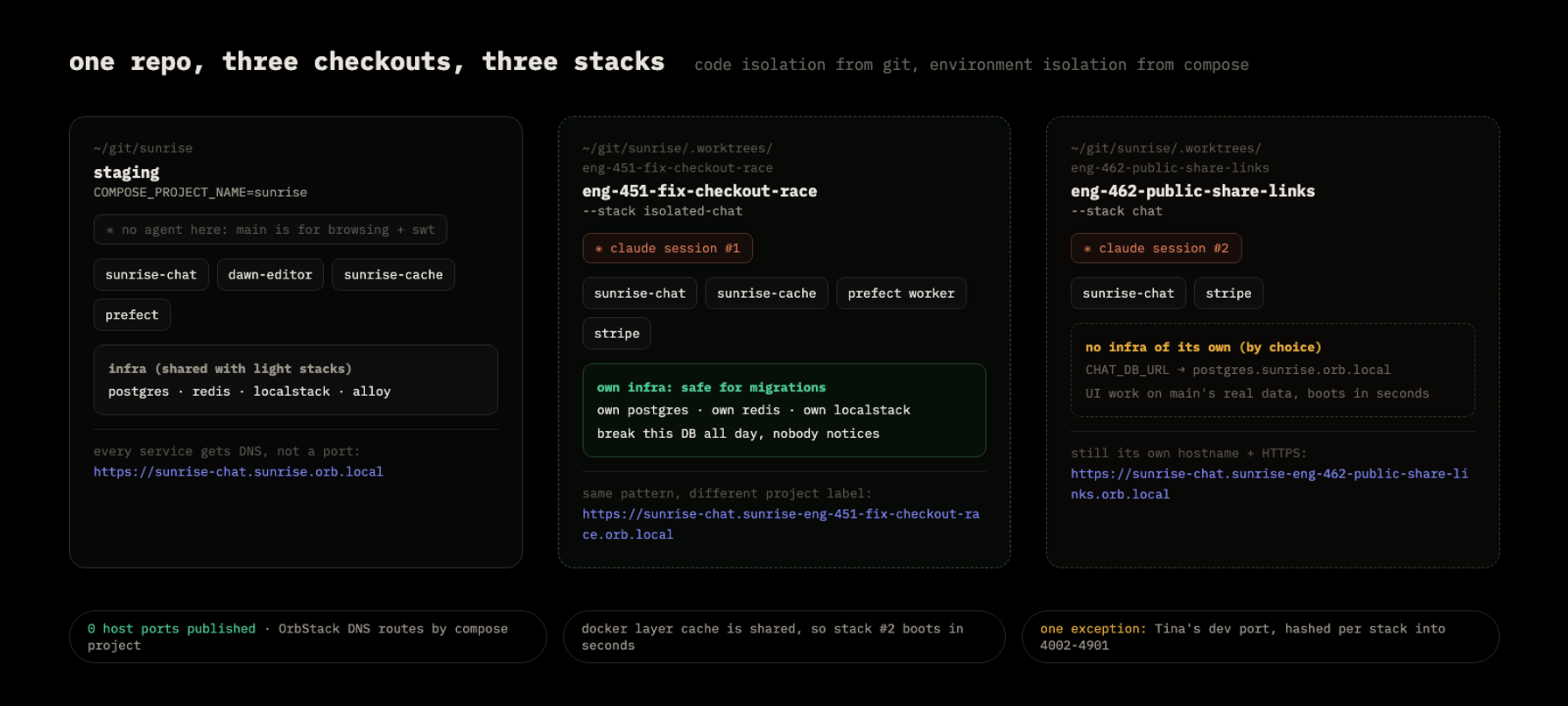
This is the foundation everything else stands on, and it's really important to get right: worktrees isolate the code, Docker isolates the world. Once both are true, Claude sessions cannot interfere with each other, and the isolated databases mean an agent can iterate violently (run migrations, wipe tables, reseed) without mangling anyone's settings or data.
The construction:
- Everything runs in Docker Compose, including in development. One docker-compose.yml at the repo root, and every service is gated behind a Compose profile (infra, cache, chat-dev, editor-dev, ...), so a stack can run any subset of the system.
- Each worktree gets its own Compose project. COMPOSE_PROJECT_NAME=sunrise for the main checkout, COMPOSE_PROJECT_NAME=sunrise-eng-451-fix-checkout-race for a feature worktree. Same YAML, different project name, completely disjoint containers, networks and volumes.
- OrbStack DNS instead of host ports. This is the trick that kills the port problem outright. We develop on macOS with OrbStack (I strongly recommend it over Docker Desktop for this), and OrbStack gives every container a hostname: <service>.<project>.orb.local, with HTTPS terminated for free. So the chat app in the main stack is https://sunrise-chat.sunrise.orb.local and the same app in a feature stack is https://sunrise-chat.sunrise-eng-451-fix-checkout-race.orb.local. Zero published host ports. Five stacks, no port table, nothing to collide. This is how you get around Claude Code eating your port range: stop giving it ports and give it hostnames.
- Two env files, layered. This is worth being precise about, because sharing environment variables across stacks is where most setups get messy: The payoff of that split: an isolated stack simply omits the infra URLs and Compose falls back to in-stack service names (its own private postgres), while a lightweight stack sets them to the main stack's OrbStack hostnames and reuses main's database. Isolation becomes a per-stack config decision, not an architecture decision.
- .env holds secrets and global config (API keys, third-party services). It's shared by every stack and copied into each worktree.
- .stack.env holds per-stack identity: the Compose project name, the profile list, and the URLs that point at infra.
- We run docker compose --env-file .env --env-file .stack.env up. Later files win, so the stack file overrides the global one exactly where it needs to.
Don't build this by hand. Ask your agent to set up your Docker configuration; it's an afternoon of supervised work. Paste this:
Read this repo and dockerise it for parallel agent development:

1. One docker-compose.yml at the repo root. Every service (apps and
   infra: postgres, redis, object storage, workers) gets a Compose
   profile so a stack can run any subset of the system.
2. Parameterise identity: the Compose project name and profile list come
   from a .stack.env file; secrets and global config stay in .env. We'll
   run compose with `--env-file .env --env-file .stack.env` so the stack
   file wins on conflicts.
3. Publish no host ports. I use OrbStack, which gives every container
   DNS at <service>.<project>.orb.local with HTTPS. Containers talk to
   each other by service name; my browser uses the OrbStack URLs.
4. Every service-to-infra connection (database URL, redis URL, queue
   API) must be an env var with an in-stack default, so a stack can run
   its own infra or point at another stack's by URL.
5. Commit a .stack.env.example documenting every variable.

Show me the plan before writing files.
4. SWT: super worktrees
Once Docker and worktrees work, you'll do the same ritual for every ticket: create the worktree, copy the env files, invent a project name, boot the stack, open the ticket, paste it to Claude, open a draft PR. That's ten minutes of setup per ticket, so the next move is obvious: build a tool that bootstraps all of it in one command. Ours is ~1,100 lines of bash called swt (sunrise worktrees, though "super worktrees" has stuck), and it turns the whole ritual into:
$ swt new eng-451 --stack isolated-chat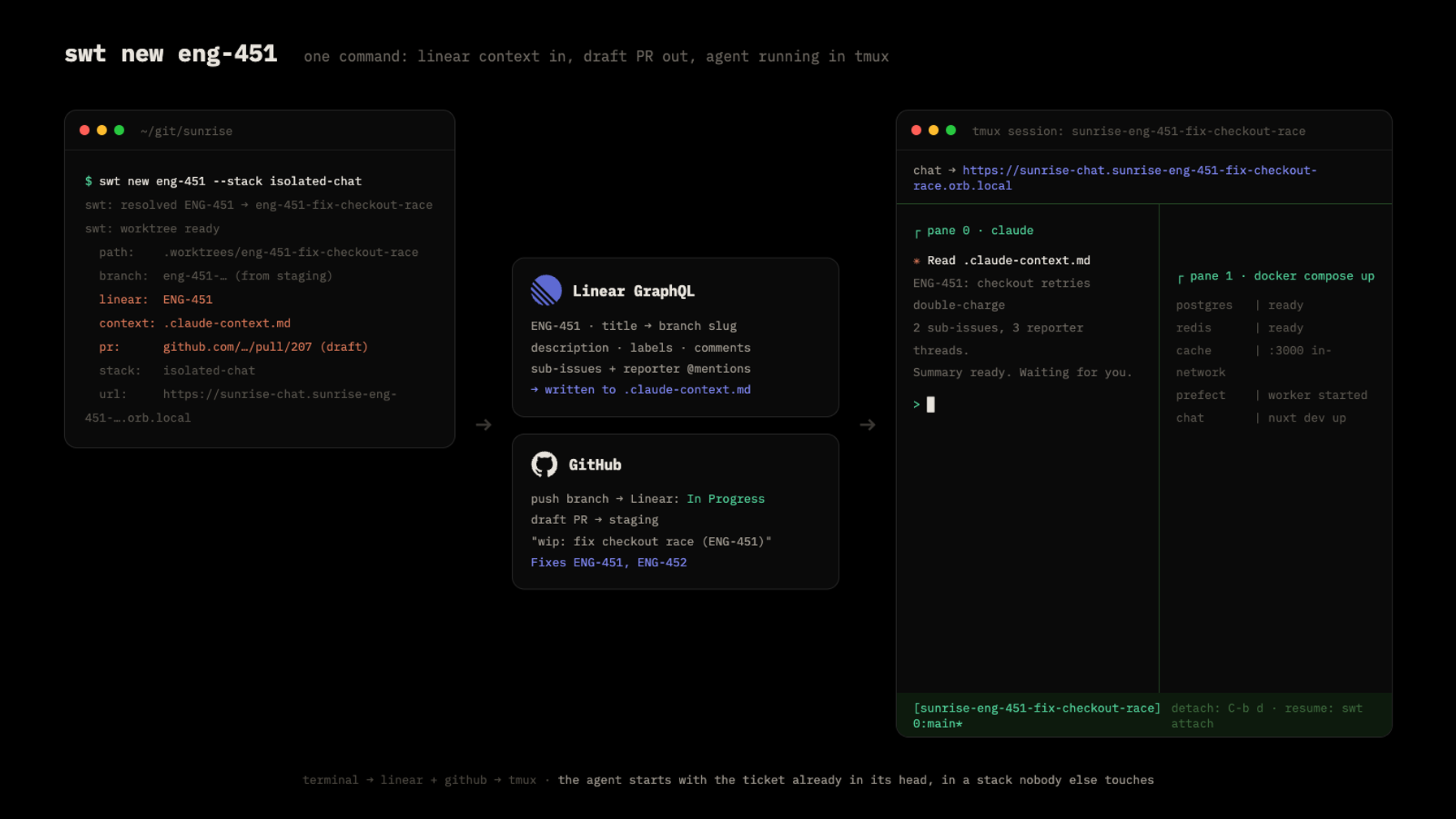
Here's everything that one command does:
- Recognises the Linear ticket. The name matches eng-<number>, so swt calls Linear's GraphQL API, fetches the issue, and expands the branch name to eng-451-fix-checkout-race from the ticket title (paste-from-Linear slugs work too).
- Creates the worktree at .worktrees/eng-451-fix-checkout-race, branched from staging, and copies in the gitignored dotfiles every checkout needs (.env and friends, listed in a .worktreeinclude file).
- Writes .stack.env with the derived project name and the profiles for the chosen stack type.
- Writes .claude-context.md: the ticket's title, description, labels, recent comments, every sub-issue with its description and comments, the reporter mentions, plus the stack's own OrbStack URLs and our commit-message conventions. That last part matters more than it sounds: the context file explicitly tells the agent its chat lives at the worktree's *.orb.local hostname, so it never defaults to localhost:3002 and wanders into someone else's stack.
- Pushes the branch and opens a draft PR against staging, titled wip: fix checkout race (ENG-451), with a Fixes ENG-451, ENG-452 line covering the parent and every sub-issue. More on why in section 5.
- Builds a tmux session named after the Compose project, with three panes: a thin banner across the top printing the stack's URL, claude on the bottom-left already prompted to read .claude-context.md and summarise the ticket, and docker compose up streaming logs on the bottom-right.
Thirty seconds after you hit enter, you're looking at an agent that has read the ticket, in a stack nobody else can touch.
Isolate fully, or only partly (this is the performance section)
The --stack flag picks how much world the worktree gets, and this is where reuse pays off:
- isolated-chat / isolated / fullstack: the stack runs its own postgres, redis and object storage. Mandatory for anything touching a DB migration or schema. Break the database all day; nobody notices.
- chat / dawn: app containers only, pointed at the main stack's infra via those .stack.env URLs. This is the "share the local staging DB" trick: for UI work you usually want main's real data, and you definitely don't want a fourth idle postgres eating RAM. These stacks boot in seconds.
- none: no containers at all, just worktree + tmux + claude, for docs and CI branches.
Reuse shows up everywhere in the numbers: the Docker layer cache is shared across all stacks (stack #2 builds nearly instantly), shared-infra stacks add almost zero overhead, and swt stack <type> can switch a worktree between types in place, preserving volumes, so flipping isolated → chat and back later doesn't lose the private database.
One confession: there's exactly one host port in the whole system. Our CMS dev server has to bind one, so swt hashes the project name into the 4002–4901 range deterministically and probes past any port another worktree already claimed. When you can't delete a port, make it deterministic.
tmux: sessions that survive you
tmux is doing more work here than decoration:
- Detach with Ctrl-b d and the agent keeps working. swt attach eng-451 drops you back in. swt list shows every worktree with its branch, tmux and stack state.
- Session preservation across reboots: tmux state dies with the machine, but the worktree doesn't. swt attach detects the dead session, rebuilds the same three-pane layout, runs claude --resume (picking up the most recent conversation in that directory), and re-runs docker compose up. Your five parallel investigations survive a restart.
- Panes are just shells: Ctrl-C the compose pane and re-run with --build, split another pane for tests, zoom the agent with Ctrl-b z.
Teardown
Cleanup is one command: swt rm eng-451 kills the tmux session, runs docker compose down -v, removes the worktree, and deletes the branch. --keep-volumes preserves the data if you expect to come back, and --keep-branch preserves the branch. Between cheap teardown and shared-infra stack types, running many stacks stays comfortably within a laptop's resources.
To get your own swt, paste this to your agent (after section 3's setup):
Docker + worktrees are set up (profile-gated compose, per-worktree
.stack.env, OrbStack DNS). Build me `bin/swt`, a bash CLI:

swt new <name> --stack <type>
- git worktree under .worktrees/<name>, branched from our default branch
- copy the gitignored dotfiles listed in a .worktreeinclude file
- write .stack.env: project name derived from <name>, profiles from the
  stack type. Define types ranging from full isolation (own DB, redis,
  storage) to app-only types that point at the main stack's infra by
  URL, plus "none" for no containers at all.
- if <name> matches our ticket pattern (e.g. eng-123): fetch the issue
  from Linear's GraphQL API (title, description, labels, comments,
  sub-issues, reporters), write it all to .claude-context.md in the
  worktree, expand the branch name to eng-123-<title-slug>, push the
  branch, and open a draft PR titled "wip: <title> (ENG-123)" whose body
  has a Fixes line listing the parent and every sub-issue
- start a tmux session named after the compose project: thin top pane
  echoing the stack's URL, bottom-left running `claude` prompted to read
  .claude-context.md and summarise, bottom-right `docker compose
  --env-file .env --env-file .stack.env up`

Also implement:
- swt list: every worktree with branch, tmux and compose state
- swt attach: reattach; if the tmux session died (reboot), rebuild the
  layout and run `claude --resume` + `docker compose up`
- swt stack <type>: switch a worktree's profiles in place, preserving
  volumes, and restart compose in its tmux pane
- swt rm: kill tmux, compose down -v, remove worktree, delete branch,
  with --keep-volumes and --keep-branch opt-outs
5. Linear in the CI/CD: the PR is the state machine
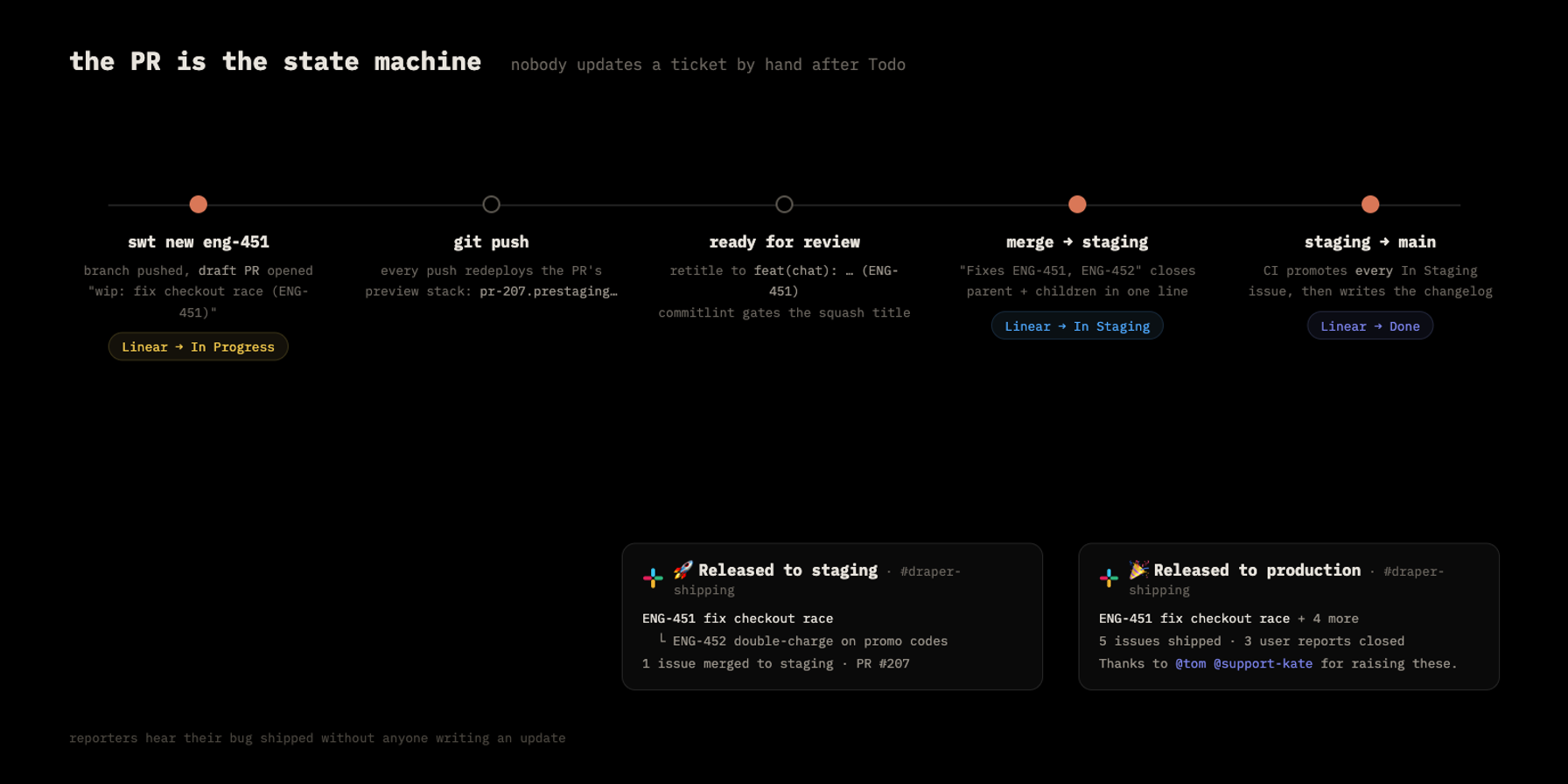
Section 2 promised that nobody updates tickets by hand. Here's the machinery.
The core idea: swt creates the PR at minute zero, as a draft, before any real code exists. The tool makes an empty scaffold commit, pushes the branch, and opens wip: fix checkout race (ENG-451) against staging. That gives us three things immediately:
- The push flips the ticket. Linear's GitHub integration sees a branch named eng-451-... and moves ENG-451 to In Progress. Starting work is the status update.
- The PR becomes the ticket's anchor. Linear links the PR onto the issue, so the Slack thread that spawned the ticket, the Linear comments, and the GitHub review all connect to one place. Context stops fragmenting across tools.
- The Fixes line is pre-written. Parent and every sub-issue, generated from the Linear hierarchy, so nothing gets forgotten at merge time.
The wip: prefix is deliberate: our commitlint config rejects it as a squash title, so a PR physically can't merge until someone retitles it to a real conventional commit (feat(chat): fix checkout race (ENG-451)). Draft + failing title check means a PR opened at minute zero is never mergeable by accident.
Then two GitHub Actions workflows close the loop:
- On PR merge into staging: a workflow parses every ENG-x reference from the PR title, body and branch name, fetches those issues from Linear, and posts a "🚀 Released to staging" changelog to our #draper-shipping Slack channel. Linear's own integration has already moved the fixed issues to In Staging. Everyone knows what's on staging without asking.
- On release (staging merged into main): a second workflow fetches every issue sitting in In Staging, transitions all of them to Done (failing loudly if any transition fails), and posts a "🎉 Released to production" changelog. The changelog clusters sub-issues under their parents, counts user reports closed, and, using those Slack @mentions preserved back in section 2, thanks each reporter by name. The person who reported a bug in Slack gets pinged in Slack when their bug ships, with zero human effort in between. Concurrency groups serialise the runs so back-to-back merges can't double-post.
One bonus that falls out of this architecture: since a ticket already contains everything an agent needs, we added an AI: Claude label in Linear that triggers a cloud workflow. It checks out staging, hands the full ticket (description, comments, sub-issues, even screenshot attachments) to Claude Code running in CI, and Claude implements the change and opens the same draft PR itself, then comments the PR link back on the ticket. Small copy fixes never touch a laptop.
The prompt for your agent:
Wire our ticket tracker into GitHub Actions:

1. Enable Linear's GitHub integration so pushing a branch containing a
   ticket id moves the ticket to In Progress, and a merged PR with a
   "Fixes ENG-x" line moves it to our staging state.
2. Add a workflow on PR merge into staging: parse every ticket id from
   the PR title, body and branch name, fetch those issues via Linear's
   GraphQL API, and post a changelog to Slack via incoming webhook.
3. Add a release workflow on push to main: fetch every issue in the
   "In Staging" state, transition all of them to Done (fail the run if
   any transition fails), and post a changelog that clusters sub-issues
   under parents and thanks reporters by the Slack @mention stored on
   each issue. Use a concurrency group so consecutive merges queue
   instead of double-posting.
4. Our worktree tool already opens a draft "wip:"-titled PR when work
   starts; make the lint config reject "wip:" as a merge title so drafts
   can never land unretitled.
6. Customise it: this whole post is one conversation
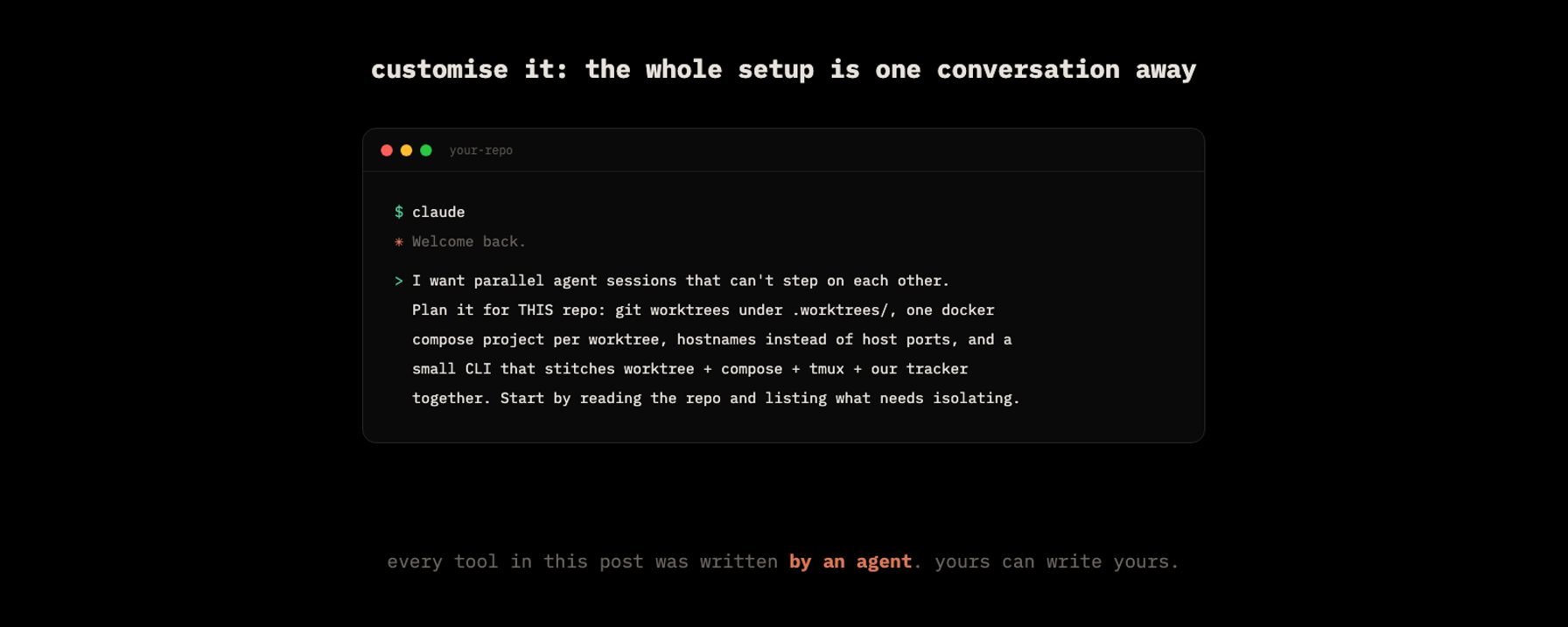
Nothing above is a product you install. It's a compose file, ~1,100 lines of bash, two GitHub Actions workflows and a couple of conventions, and every piece of it was designed and written by the same kind of agent it now bootstraps. That's the real thesis of this post: in 2026, dev tooling of this shape costs a conversation, not a quarter.
Which also means none of it is sacred. Swap Linear for Jira and the GraphQL calls change, not the shape. Swap tmux for zellij, OrbStack for anything that gives containers hostnames, bash for whatever you like. Run three panes or five. Keep the ideas:
- Environment isolation, not just code isolation. One compose project per worktree.
- Hostnames, not ports. The port problem doesn't get managed; it gets deleted.
- Reuse what doesn't need isolating. Shared infra for light work, shared layer cache, preserved volumes.
- The ticket travels to the agent, in a context file, at bootstrap.
- The PR is the state machine. Humans write and prioritise tickets; git moves them.
Start by pasting your repo's reality into your agent and asking for step one. Ask it to edit any of this to support your needs; that's the workflow now.
If you want the other half of this story, how these branches actually deploy (every PR gets its own full preview environment on a single cheap VPS, plus the staging → production release pipeline), let us know in the responses and we'll write it up.
Built at Draper. All commands and diagrams in this post are from our live setup, lightly renamed.